
Every feature
Everything SitterWorks does for your business.
Solo and Pro share every tool except client texting, which comes with Pro. Pro also adds more logins and unlimited bookings. Anything marked coming soon is not in the app yet.
Bookings and calendar
Rover and direct bookings on one calendar, with room and conflicts checked before a dog arrives.
All areasOne calendar for every booking
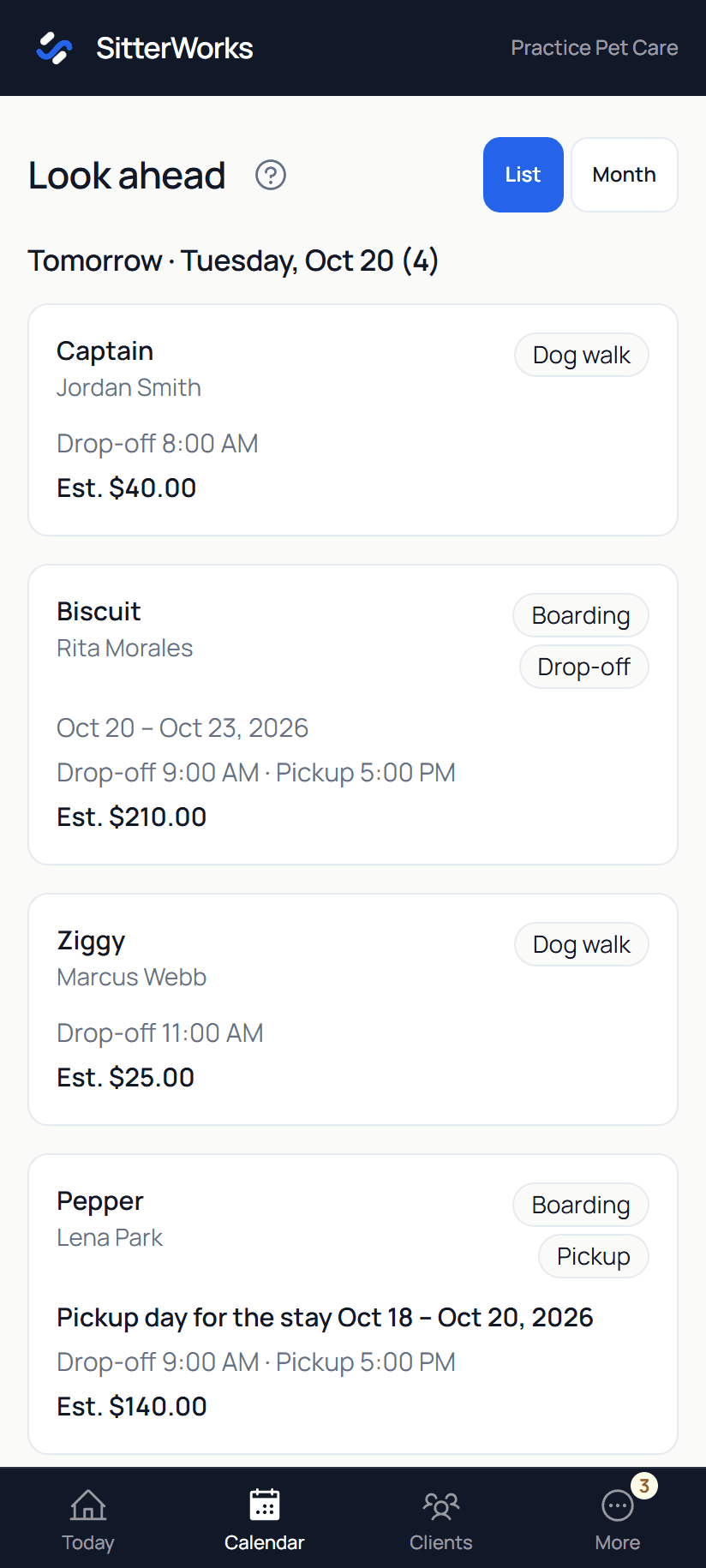
Rover stays and direct bookings sit side by side. A 14-day list shows who is coming and going, and a month view shows which days have room.
Every service you offer
Boarding, daycare, house sitting, drop-in visits, dog walks, meet and greets, training sessions, board and train, and consults. Turn on only the ones you offer.
Several dogs in one booking
Book a family's dogs together for boarding, daycare, or a home visit, with one card and one invoice.
Your own booking page
Share one link. Clients see the services you take online, and each service can confirm instantly or wait for your OK.
Requested dates are held
Requested dates are held for a week while you and the client work it out. They count toward your dog limit, show on your calendar, and Today asks after a week whether to keep holding.
Usual drop-off and pickup times
Set your usual drop-off and pickup time for each stay service. Dog owners see it is only a usual time on their stays and can ask for a different one before the stay starts; you approve it or suggest another with one tap.
Hours, days off, and notice
Set your usual week, close single days, and choose how much notice you need and when clients can still cancel or reschedule.
Room checks and conflict warnings
SitterWorks counts the dogs in your care each day and warns you about overlapping visits or house sitting on nights dogs board with you. Set the most dogs you take at once and the number you are comfortable with, and busy nights are coloured against both.
Google Calendar connection
Bookings go onto your Google Calendar, and your busy times there keep clients from booking you. Visit events can show the client's address, if you turn it on.
Printable client schedule
Print or save a plain schedule of a client's upcoming bookings with what is paid and what is still owed.
Online booking for walks and visits
Clients request a walk, drop-in or house sit from your booking page or portal, picking a free time or dates. You put dogs together on a group walk.
Rover, kept in view
Keep the marketplace work that already pays you, without double booking against it.
All areasRover calendar sync
Paste your Rover calendar link once. Rover stays, walks, drop-ins, and house sits show up next to your direct bookings, checked every day and each time you open Today or the calendar.
Returning dogs, recognized
A Rover booking is matched to the dog you already know, with its notes, history, and compatibility. Pick the dog once and SitterWorks remembers.
Automatic Rover bookings
Confirmed Rover stays, walks, drop-ins, and house sits become bookings on their own when SitterWorks is sure of the dog and the service. A walk booked for several days becomes one visit a day. Anything unclear waits for you.
Automatic check-in for Rover dogs
Rover dogs check in at drop-off and out at pickup without a tap, and you can undo one that didn't come.
A full check on Rover requests
When a Rover request is waiting, Today shows whether you have room, who is staying with the new dog, whether the dogs are fixed, and any dogs that don't get along. Tap See the full picture for a night-by-night calendar, who is here and when that changes, and how the dogs have got along before. For a house sit it shows what else is on your schedule. Nothing is saved or sent anywhere.
A note when sync stops
If Rover can't be reached, Today says so and your saved bookings stay put.
Rover walks and visits recognizedComing soon
Rover walks, drop-ins, and house sits are filed as the right service, with multi-day stays split into visits.
Clients, dogs, and compatibility
What you learn about a dog stays useful the next time it visits.
All areasClient and dog profiles
Care notes, medications, vet, emergency contact, vaccine proof, photos, and the full history of bookings and messages in one place.
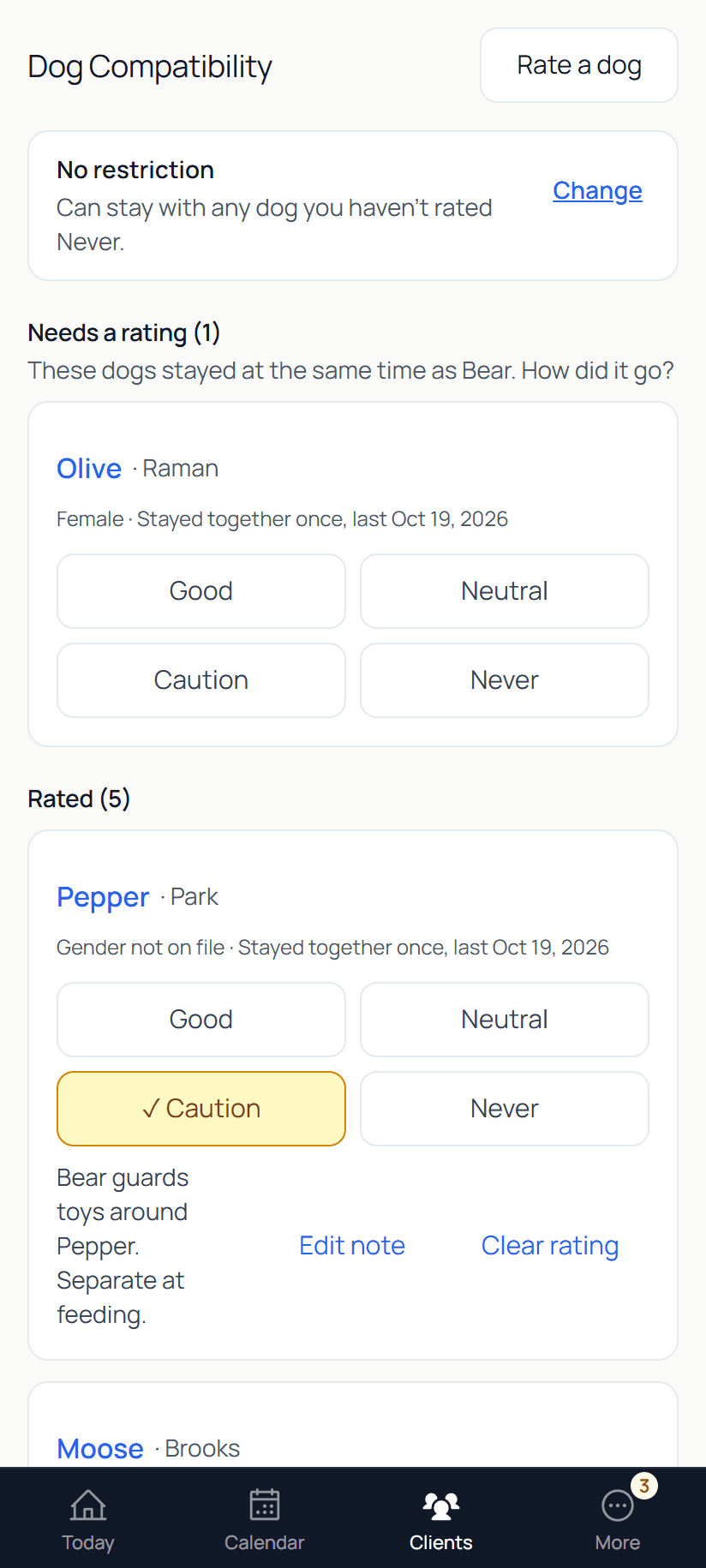
Dog compatibility ratings
Rate each pair of dogs Good, Neutral, Caution, or Never. Never blocks overlapping bookings and Caution warns you. SitterWorks lists the dogs that stayed together and still need a rating.
Stay wrap-up
When a dog goes home after meeting a dog it had never stayed with, a to-do on Today asks how they got on. One tap rates each pair, with room for a private note.
Stay restrictions
Mark a dog as solo only, female dogs only, or male dogs only, and bookings that break the rule are stopped before they are made.
Clients fill in their own details
Send a link and the client adds a missing address, emergency contact, vet, or vaccine record without signing in.
Merge duplicate clients
When the same household shows up twice, SitterWorks offers to combine them. You pick which details to keep, and the extra record is archived, not deleted.
Import from a spreadsheet
Bring your client list in from a CSV file, and check what each column holds before anything is saved.
Home access card
Entry notes, key spots, and door and alarm codes in one place. Codes are encrypted and hidden until you tap Show, and clients can add their own from the update link.
The Today screen
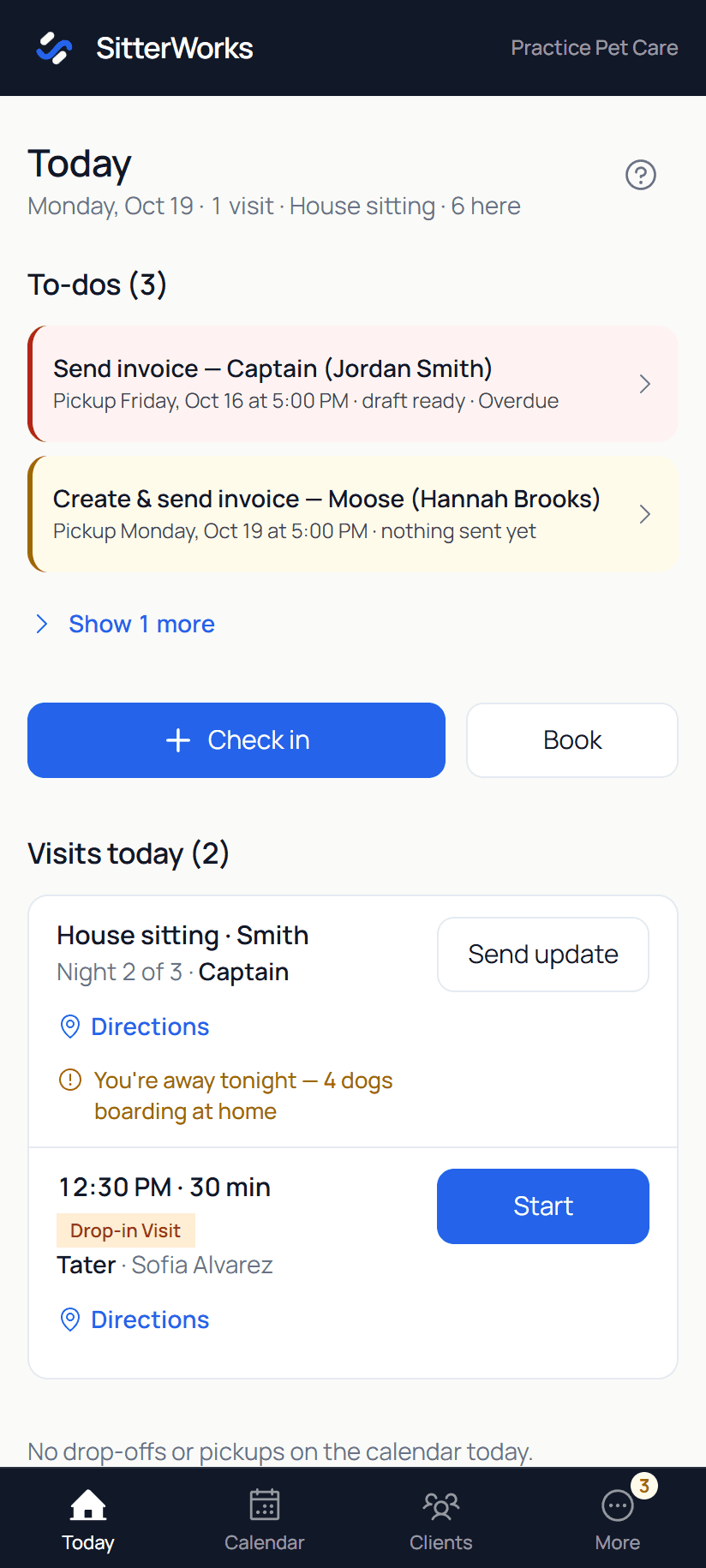
Who is expected, who is here, medications due, home visits, and to-dos, with late pickups and unpaid stays flagged.
One-tap check-in and check-out
Check dogs in and out with one tap each, and undo a mistake from the bar at the bottom.
Medication and care reminders
Doses due today show on Today. Mark each one given, and it moves to Done today.
Home visits with Start and Done
Walks, drop-ins, and house sitting appear in time order with directions, Start, and Done.
Report cards and visit updates
When a stay or visit ends, send the client a short note with up to four photos, without writing an email.
Meet and greet wrap-ups
Tap a quick note on how the meet and greet went. It's saved to the dog's profile with the date.
Phone alerts and a morning summary
Push alerts for what needs you, and one summary each morning of everything on today: drop-offs, pickups, walks, visits, house sits and appointments.
Leads and follow-ups
A small business has no sales team. SitterWorks makes sure nobody gets forgotten.
All areasOne inbox for new leads
Requests from your booking page and your own website's contact form land in one list.
Spam kept out of your inbox
Sales pitches and bot messages go to a spam pile instead of your leads, with no alert. Mark one as spam and that sender's next messages go there too. Anything caught by mistake is one tap away.
Replies with starting points
Answer a lead from SitterWorks under your business name, starting from a ready message with their name and their dog's name filled in.
Lead to client in one step
Convert a lead and the new client form already has their name, contact details, dog, and address.
Follow-ups with AI drafts
SitterWorks notices a consult that didn't book, a lead that went quiet, or a package that ended. It writes the nudge, you review and send, and it closes itself after two tries.
Approved clients get a nudge on their own
Tick "we'd take this dog" after a consult or a meet and greet. The owner gets a link to book training or confirm their stay, plus one reminder a week later. Held boarding dates are released if no one confirms. Dogs you don't tick get nothing.
A rate card for every service
Set your prices once. Bookings and invoices use them.
Invoices from bookings
Invoices start as drafts from the booking's real price. Edit lines, add a discount, email a pay link, or print and save as a PDF.
Automatic invoices, on your schedule
New bookings are invoiced up front: the full invoice goes out soon after you confirm and is due when you choose for each service. Rover bookings are left to Rover. Bookings you made before keep the schedule they had.
Card payments through your own Stripe
Clients pay by card, Apple Pay, Google Pay, Cash App Pay, Amazon Pay or straight from their bank account, and the money goes to your Stripe account. SitterWorks takes 0% of client payments.
Cash, Venmo, and Zelle recorded
Record a payment you collected yourself at no cost. A dog owner can offer to pay cash at drop-off and you tap Accept or Decline, or mark a regular as someone who always pays cash at drop-off. A request you have not answered counts as accepted on the day of service.
A Google review ask on receipts
Paste your Google review link, and clients who pay by card get a Leave a review button on their receipt: once, then at most every six months.
Cancellation fees you control
Turn on late-cancel fees for each service: a flat amount, a percent, or Rover style. Clients see the fee before they cancel, and you charge it or waive it with a tap. Card refunds go back through your Stripe, and your contract wording follows your settings.
Get paid before the service
Every new booking outside Rover is paid before the service. For each service you choose when payment is due: the day of service, at booking, or a number of days before. The dog owner gets one reminder. If it is still unpaid, you choose to cancel the booking or keep it. Nothing cancels on its own.
Who owes you, at a glance
See what is outstanding, collected this month, cash still expected, and tips.
Client portal and contracts
Your clients see your business, not ours, with SitterWorks as quiet attribution.
All areasA portal for each client
Clients sign in with a link sent to their email and see upcoming bookings, receipts, and invoices to pay. They can book, approve, cancel, or ask for a change, and sign out on every phone and computer at once.
Two owners per household
Add a second owner to a client. They get the same booking and billing emails and the Google Calendar invite, each with their own sign-in link, and either owner can confirm or pay. Texts, contracts, and update links stay with the main owner.
Contracts signed online
Create a boarding or training contract filled in with the client and their dogs, then send a signing link. Agreements last one year, and Today reminds you before one ends so you can send a new one.
Your own contract wording
Start from a sample, make the terms your own, and choose whether a new client must sign before their first booking. The sample is not legal advice.
Car outings permission
Turn on a yes or no question for each dog when the owner signs the boarding agreement: may you take their dog in your car on outings. The answer shows on the dog's page, a warning shows at check-in when it is a no or not answered, and you can record an answer the owner gave you in person. Nothing is ever blocked.
Client textingProComing soon
Booking confirmations, reminders, and updates by text, only for clients who agree to texts.
Training plans
Set a goal and a list of topics for each dog and rate each one as the dog learns it, from Intro to Rock solid. Add homework for the owner and setup-for-success items for the home, and set how many sessions and where. Build the plan at the consult by tapping: tag the dog (puppy, rescue, reactive...) and pick from the topics those tags suggest. Start from scratch or from an AI draft.
Training packages
Approved clients pick a package from your rate card in their portal, and you approve it.
Transcripts help, if you record
Recording is optional. If you have a transcript from your recorder app, paste or upload it and SitterWorks drafts the notes and pre-ticks the plan topics you worked on. Anything else it hears shows as a suggestion you tap to add, and nothing is saved until you tap. Two dogs from one recording each get their own wrap-up.
A starter topic library, yours to edit
Training opens with about 26 common topics, tagged so you can filter and search, plus 7 setup-for-success items. Rename, retag, merge or remove any of them, and add your own from the Training tab.
A plan page the owner can read
One plain page of the plan, what to practice and how each topic is going, that the owner sees in their portal and you can print, add to your email, or copy as text.
One-minute wrap-ups by tapping
After a session, rate the homework, tap the topics you worked on and what changed, set the next homework and what's next. No recording and no typing needed. Saving marks the package session done, and you can email the client a recap or copy it as a text.
Saved homework you tap
Save the homework you give most, like hand feeding, with how often, how long and short reminders for the owner. Then tap it on a wrap-up or a dog's page instead of typing it again.
A short recap you can email or copy
After a wrap-up, get a plain recap of the session with your own note at the top. Email it to the client, or copy it to paste into Rover. No AI writes it.
Prep page for each session
Tap a training card on Today and you land on the dog's training page. It shows the next session with its date and time, the homework you gave, and what happened last time. Tap it to prep early.
A training page for each dog
One page per dog with the plan under the owner's goals, the next session, a list of every session with its topics and ratings, a tap-through wrap-up, and a printout for you that lines up with the plan the owner reads.
Goals first
Group a dog's topics under what the owner wants, like a calm walk or coming when called. Topics every dog learns sit in their own Foundations group. The owner sees their goals; you see both. When every topic under a goal is ready to build on, SitterWorks suggests marking it met, and you can add a Goal met line to the next recap.
Training programs
Save a standard set of topics, homework and setup items once, like Foundations, and start every new dog from it. Start with a ready-made Foundations program, or build your own. Change a program any time. Plans already made stay as they are.
A consult that starts with the owner's goals
At the consult, pick a program, then add what the owner wants for the dog in their own words. Tap topics under each goal. Read my notes can suggest goals and topics from your notes. Nothing is added until you tap it.
Pick-ups and drop-offs on bookings
Tick a box on a booking and SitterWorks prices the trip from your home base to the client.
Trip log and mileage report
Log any business drive in under 30 seconds. Walks, drop-ins and house sits log their own trip when you tap Done. Download a yearly mileage log as a spreadsheet or PDF for your tax preparer. It's a record of your trips, not tax advice.
Team logins and roles
Give a helper their own login. Built-in Owner and Staff roles, or make your own role that allows only what you choose.
Export everything
Download your clients, dogs, bookings, invoices, training records, photos, and files as one ZIP file whenever you like.
Built for your phone
Add SitterWorks to your home screen and use it like an app, in light or dark mode.
Help inside the app
Search plain-language help articles, or ask a question and follow the reply in the same place.
Set up on your own
A guided setup walks you through your business details, rates, booking link, and first client. No setup call needed.
Not sure yet?
Answer four questions and see your fit right away.
No email, no name, no phone number. You see the answer as soon as you finish.